
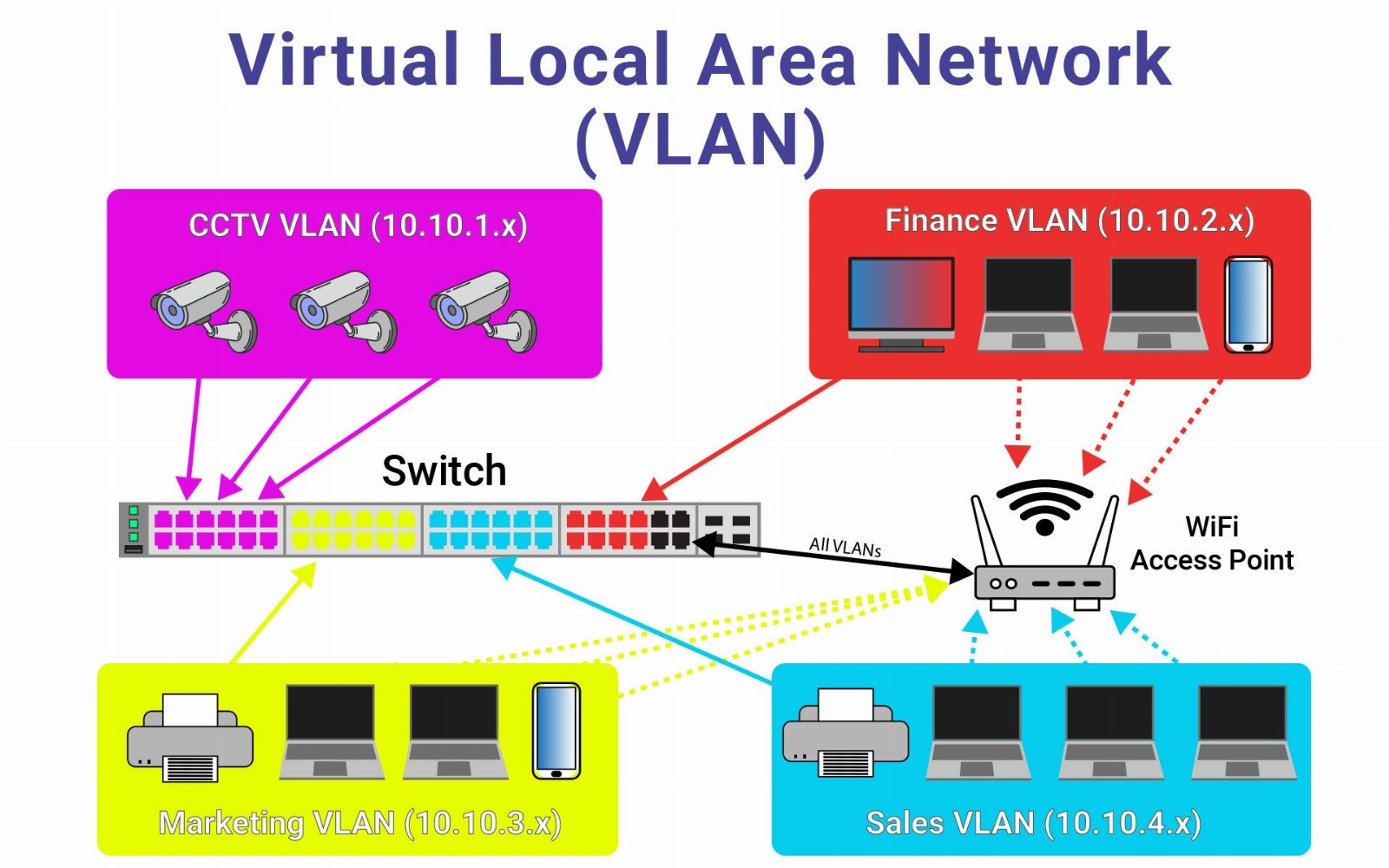
A VLAN (Virtual Local Area Network) is a logical segmentation of a physical network into multiple isolated broadcast domains, allowing devices to communicate as if they were on the same physical network — even if they're not connected to the same switch or physical location.
In simpler terms, VLANs allow network administrators to separate groups of devices (like departments or functions) on the same physical infrastructure, improving performance, security, and manageability.
How VLANs Work
By default, a switch sends broadcast traffic to all ports. VLANs change this behavior by tagging traffic with a VLAN ID, so only devices on the same VLAN receive it.
Key components include:
- Access Ports: Assigned to a single VLAN; connect end devices like PCs or printers.
- Trunk Ports: Carry traffic from multiple VLANs, usually between switches or to routers.
- VLAN Tagging: Protocols like IEEE 802.1Q add VLAN tags to Ethernet frames, allowing trunk ports to distinguish traffic from different VLANs.
Example Use Case
Imagine an office with three departments:
- HR (VLAN 10)
- Finance (VLAN 20)
- Sales (VLAN 30)
Even if all departments are connected to the same physical switch, their traffic will be logically isolated unless routed, preventing accidental or unauthorized communication across departments.
Advantages of VLANs
- Enhanced Security: Devices on different VLANs can't communicate directly without routing, helping contain sensitive data (e.g., HR and Finance).
- Reduced Broadcast Traffic: VLANs limit broadcast domains, reducing unnecessary traffic and improving performance.
- Logical Grouping: Users and devices can be grouped logically (by function, not physical location), offering flexibility.
- Simplified Network Management: VLANs make it easier to apply policies, QoS, or security settings to specific user groups or services.
- Scalable: VLANs support large, segmented networks across multiple buildings or locations.
Disadvantages of VLANs
- Configuration Complexity: Misconfigurations (especially in trunking or tagging) can cause traffic loss or security holes.
- Inter-VLAN Communication Requires Routing: A Layer 3 device (router or Layer 3 switch) is needed to allow communication between VLANs, adding cost and complexity.
- Troubleshooting Challenges: VLAN issues (e.g., tag mismatches, port assignments) are harder to diagnose than problems in flat networks.
- Inconsistent Security Without ACLs: VLANs by themselves don’t enforce access rules — Access Control Lists (ACLs) or firewall policies are still needed for true isolation.
VLAN vs Subnet
| Feature | VLAN | Subnet |
|---|---|---|
| Definition | Logical layer-2 broadcast domain | Logical layer-3 IP network |
| Function | Isolates broadcast domains | Segments IP address ranges |
| Implementation | Done via switches | Done via IP addressing/routing |
| Communication | Requires router or Layer 3 switch | Requires router |
Often, VLANs and subnets are configured together for complete logical segmentation.
Common Use Cases
- Departmental Segmentation (HR, IT, Sales)
- Voice VLANs for IP telephony systems
- Guest Networks to isolate visitors from internal systems
- IoT Device Isolation (CCTV, smart sensors)
- Data Center Segmentation for app, DB, and web tiers
Conclusion
VLANs are a fundamental tool in modern networking, enabling better segmentation, security, and scalability without needing separate physical networks. When used correctly, VLANs improve performance and policy enforcement, but they must be planned and managed carefully to avoid misconfigurations and unintended access paths.