
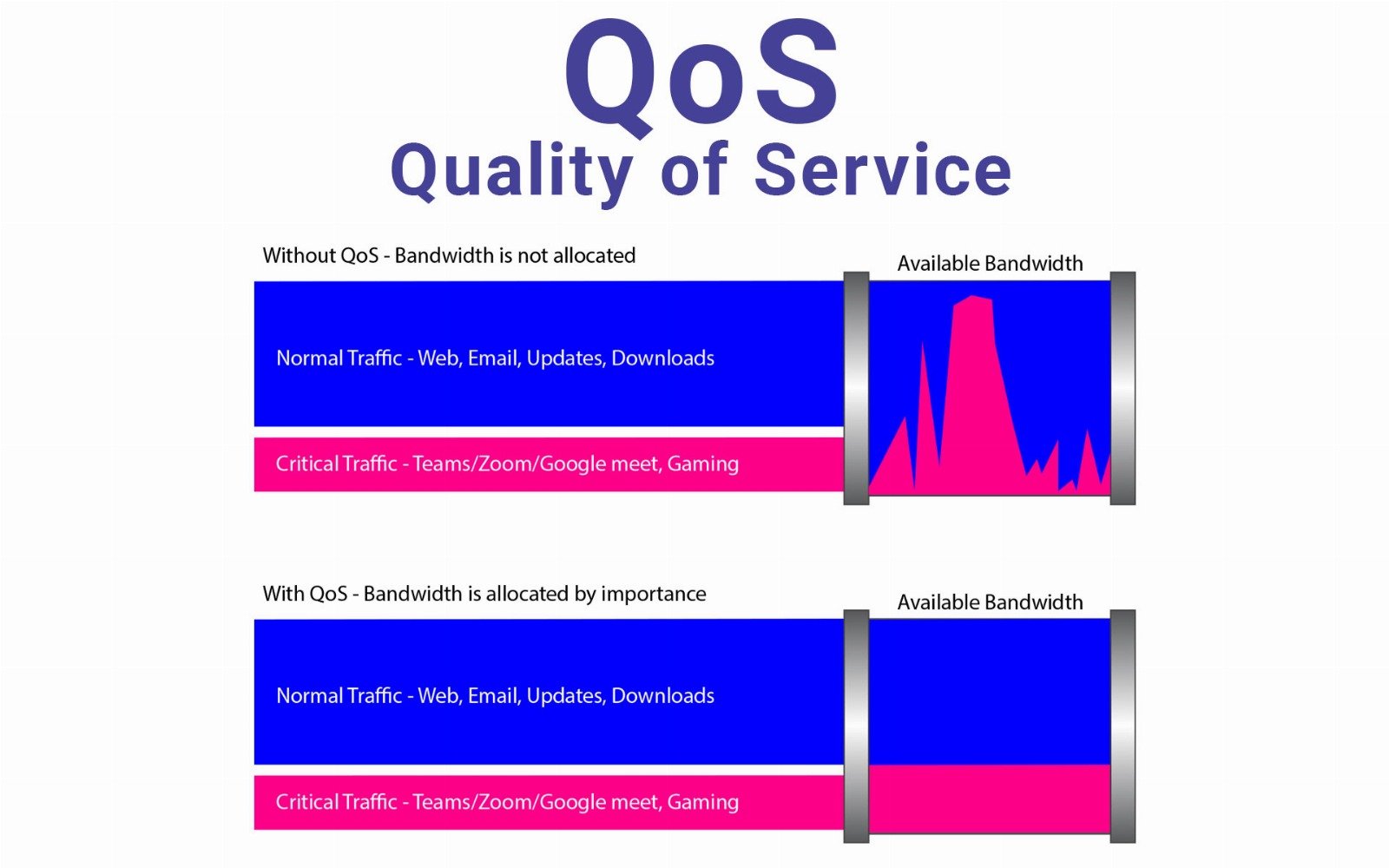
Quality of Service (QoS) is a set of technologies and techniques used in networking to manage and prioritize traffic. It ensures that critical or time-sensitive data — like VoIP calls, video conferencing, or gaming packets — are transmitted with minimal delay, jitter, and packet loss, even when the network is under load.
QoS is most often used in:
- Enterprise networks
- Home networks with smart devices
- Voice-over-IP (VoIP) systems
- Streaming and gaming setups
- Public and private cloud networks
QoS works by identifying different types of network traffic (via port numbers, IP addresses, MAC addresses, or application types), then applying priority rules. This can include bandwidth allocation, traffic shaping, queuing methods, and packet tagging using protocols like DiffServ (DSCP) or 802.1p.
How QoS Works
QoS typically involves:
- Traffic Classification: Identifying and labeling types of traffic (e.g., VoIP, HTTP, file downloads).
- Traffic Prioritization: Assigning priority levels (e.g., high for VoIP, low for bulk downloads).
- Bandwidth Management: Allocating minimum and maximum bandwidth per application or user.
- Queuing and Scheduling: Managing how packets are held and transmitted, especially during congestion.
Pros of QoS
- Improved Performance for Critical Applications: QoS ensures high-priority traffic (like voice or video) is not delayed or dropped, which is critical in businesses or homes using VoIP or video calls.
- Reduces Latency and Jitter: By prioritizing latency-sensitive traffic, QoS helps maintain a consistent experience for time-critical applications like gaming, conferencing, and telemedicine.
- Better Bandwidth Management: QoS allows administrators to control and distribute bandwidth fairly across users and applications, preventing single users or services from hogging the network.
Cons of QoS
- Complex Configuration: Setting up QoS correctly requires in-depth knowledge of networking protocols, port numbers, traffic types, and often CLI configuration on routers or firewalls.
- Not Effective on Encrypted or Unknown Traffic: With the rise of encrypted traffic (like HTTPS or VPNs), it’s harder to classify and prioritize packets without deep packet inspection (DPI), which may not be supported or legal in all environments.
- Limited by Network Bottlenecks: QoS can manage how traffic is handled on your local network, but it doesn’t control your ISP’s network. If your internet connection is slow or congested outside your local environment, QoS can’t fix it.
Typical Use Cases
- VoIP and Unified Communications: Ensures voice and video packets are prioritized for clarity and reliability.
- Gaming Networks: Reduces ping and lag spikes by prioritizing gaming packets.
- Streaming Media: Keeps video streams smooth by ensuring a steady flow of data.
- Corporate Networks: Balances bandwidth between departments or services (e.g., limiting file downloads during video meetings).
Conclusion
QoS is a powerful tool for optimizing network traffic in both business and home environments. While it requires careful planning and knowledge to configure effectively, the benefits — especially for real-time communication and performance-critical tasks — are significant. However, it is not a cure-all and must be combined with adequate bandwidth, modern networking hardware, and good internet service to realize its full potential.